
Real Time with LiveView
Ticket Creation in Real Time
Read time: 6 minutes
This lesson is a direct continuation of a previous lesson
git clone https://github.com/adopt-liveview/lineup.git --branch form-component-done.
Without further ado, let's dive into the code!
#Broadcasting new tickets
One of the reasons we created a Queue context file was to centralize where our operations live. This makes it easier for us to maintain code over time. This is one of such times. Head out to the Queue module and update create_ticket/2 like this:
defmodule Lineup.Queue do
  @moduledoc """
  The Queue context.
  """

  import Ecto.Query, warn: false
  alias LineupWeb.Endpoint
  alias Lineup.Repo

  alias Lineup.Queue.Ticket

  # ...lots of functions

  @doc """
  Creates a ticket and broadcasts its ID when successful.

  ## Examples

      iex> create_ticket(%{field: value})
      {:ok, %Ticket{}}

      iex> create_ticket(%{field: bad_value})
      {:error, %Ecto.Changeset{}}

  """
  def create_ticket(attrs) do
    %Ticket{}
    |> Ticket.changeset(attrs)
    |> Repo.insert()
    |> tap(fn result ->
      if match?({:ok, %Ticket{}}, result) do
        {:ok, ticket} = result
        Endpoint.broadcast("queue:tickets", "add_ticket", %{ticket_id: ticket.id})
      end
    end)
  end

  # ...rest
end
We have two new things in here. First, we added a tap/2 functione into our pipeline. This function always receives a value and a function. It calls the function with the value and returns the value unchanged. By using tap/2 we are making it clear that whatever the contents of this function are they will not affect the result of the pipeline.
The other function introduced here actually a macro called match?/2. This macro compares the pattern passed on the first argument to the value passed on the second argument. It returns true if the pattern matches the value. Since we don't really care about other clauses from create_ticket/1 we only match success cases so we broadcast the result.
Last but not least, we use Endpoint.broadcast/3 to send a message to the queue:tickets channel when a ticket is created. Make sure to add alias LineupWeb.Endpoint at the top of the module too.
#Listening to new tickets in our TicketLive.Index
Lets talk business, edit TicketLive.Index to add those:
defmodule LineupWeb.TicketLive.Index do
  use LineupWeb, :live_view

  alias Lineup.Queue
  alias LineupWeb.Endpoint

  @impl true
  def mount(_params, _session, socket) do
    Endpoint.subscribe("queue:tickets")

    {:ok,
     socket
     |> assign(:page_title, "Listing Tickets")
     |> stream(:tickets, list_tickets())}
  end

  # ...handle_event

  @impl true
  def handle_info(
        %Phoenix.Socket.Broadcast{
          topic: "queue:tickets",
          event: "add_ticket",
          payload: %{ticket_id: ticket_id}
        },
        socket
      ) do
    ticket = Queue.get_ticket!(ticket_id)
    {:noreply, socket |> stream_insert(:tickets, ticket)}
  end

  # ...a lot of stuff
end
We just introduced you to a new callback called handle_info/2. This callback can be used by LiveViews to handle incoming messages from other processes. From the previous lesson we already know that Endpoint.broadcast/3 send us messages in %Phoenix.Socket.Broadcast{...} format so we can quite easily parse them to extract the information we need. Now you can probably see how topics and events are used to define the behavior of the real time updates. Don't forget that all it took was us adding Endpoint.subscribe("queue:tickets") and this LiveView instantly was able to receive real time updates from the queue!
Not only that we also sneaked in stream_insert/4 in there to add a ticket to our stream. That function will add an element to the end of the stream by default which just fits our use case perfectly.
#Writting maintanable code
Just as we focus Ticket operations on our Queue module we should also ensure our PubSub abstractions are well-defined and easy to be reusable on the future. Go back to Queue module and add those:
@topic "queue:tickets"

@doc """
Keep track of tickets changes on the queue:tickets topic

## Events

    %Phoenix.Socket.Broadcast{topic: "queue:tickets", event: "add_ticket", payload: %{ticket_id: 1}}

"""
def subscribe_to_tickets() do
  Endpoint.subscribe(@topic)
end

@doc """
Broadcasts "add_ticket" event to the queue:tickets topic
"""
def broadcast_ticket_created(ticket) do
  Endpoint.broadcast(@topic, "add_ticket", %{ticket_id: ticket.id})
end
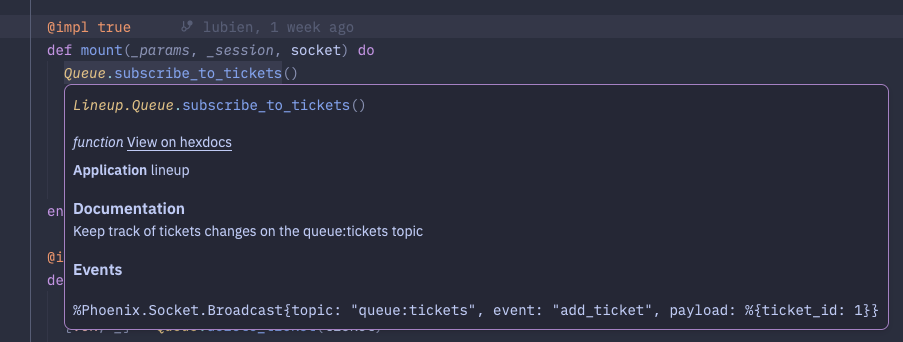
We now set the topic as an elixir module tag so we can easily change that on the future if ever needed and also we hide our PubSub implementation details from the rest of the application. Make sure to also update TicketLive.Index to use the new Queue module now:
- Endpoint.subscribe("queue:tickets")
+ Queue.subscribe_to_tickets()Besises, we also get intellisense on our code editor now too.
#How to test real time updates?
We are not ending this lesson without adding tests to these updates. Head out to Lineup.QueueTest and update our creation test like this:
test "create_ticket/1 with valid data creates a ticket and broadcasts the update" do
  valid_attrs = %{called_at: ~U[2026-04-27 16:00:00Z]}

  Queue.subscribe_to_tickets()

  assert {:ok, %Ticket{} = ticket} = Queue.create_ticket(valid_attrs)
  assert ticket.called_at == ~U[2026-04-27 16:00:00Z]
  new_ticket_id = ticket.id

  assert_receive %Phoenix.Socket.Broadcast{
    topic: "queue:tickets",
    event: "add_ticket",
    payload: %{ticket_id: ^new_ticket_id}
  }
end
We can easily subscribe to ticket updates and use a helper function assert_receive/3 to verify the broadcast message arrived at this test process. We also use pattern matching to verify the ticket_id in the payload matches the ticket we created using the pin operator ^ which tells the pattern matching to match the exact value of new_ticket_id.
As for our TicketLiveTest, it could have been easier:
test "receives new tickets via pubsub", %{conn: conn} do
  {:ok, index_live, html} = live(conn, ~p"/")
  new_ticket = ticket_fixture()
  assert has_element?(index_live, "#tickets-#{new_ticket.id}")
end
We can add a new test case that enters the ticket list liveview then creates a new ticket and verifies it appears in the list. Using has_element?/3 we can use a CSS selector to check that #tickets-ID exists in the HTML. And if you're curious where that ID comes from, it's actually from our tickets stream html_id. Any stream called :elements will have an html_id generated for it automatically as #elements-ID so our test case can use that to verify the element exists.
#Summary!
-
Using
tap/2you can run code inside a pipeline without messing with the final result. -
The
match?/2macro is useful when you just want to match a single clause unlikecondandcasewhich require multiple clauses. -
Elixir uses
handle_info/2callback to handle messages sent to a process. -
Using
stream_insert/4you can append a value into a stream without modifying the stream itself. - Prefer to hide implementation details from your PubSub subscriptions on methods in your context not only to make code more reusable but also to make it easier to maintain and test later.
-
Testing PubSub updates become trivial with
assert_receive/2. -
LiveView streams automatically generate an
html_idfor each element in the stream, so you can use that to verify elements exist in the HTML. -
The
has_element?/3function is useful for verifying elements exist in the HTML of a LiveView.
Feedback
Got any feedback about this page? Let us know!
